The Watchbill

The Watchbill pricing

Price follows the number of sites you check. Prices are in US dollars.

A year is ten months' price, two months free. Paid buttons use yearly billing.

Free

$0


5 checks

Try it on one client's sites.

Email when a site goes down.

  • Email alerts
  • Client status pages
  • One monthly report
  • Wall view for your office screen

Starter

$90/year

$7.50 a month, 2 months free

50 checks

A handful of client sites.

More checks, and a weekly report.

  • Everything in Free
  • Weekly or monthly reports
  • 1 TV wall link, no sign-in
Start Starter

This subscription renews automatically until you cancel, at $90.00 per year. Cancel anytime from your account page to stop the next charge.

Business

$290/year

$24.17 a month, 2 months free

250 checks

Larger MSPs.

The same alerts, for a larger list.

  • Everything in Pro, plus...
  • Status pages leave off the Monitoring by The Watchbill line
  • Unlimited TV wall links
Start Business

This subscription renews automatically until you cancel, at $290.00 per year. Cancel anytime from your account page to stop the next charge.

  • Ticket email on Pro and Business goes to the mailbox your PSA already turns into a ticket. It doesn't call your PSA's API or close the ticket. Supported PSAs.
  • On Pro or Business, you can add 100 more checks for $96 a year, billed with your plan.
  • Kaseya VSA 10 is available on Pro and Business.
  • Annual plans bill once a year. Extra checks on that bill are $96 a year per block. That block is twelve months at $8.
  • A check is one website. The price follows checks, not people or clients. One account has one sign-in. Stop renewal from your account. To delete the account and its data, email info@thewatchbill.com. A period that has already started is not refunded.
  • Free plan, no card. You can upgrade any time. Stop renewal any time. A period that has already started is not refunded.

The Watchbill vs UptimeRobot · The Watchbill vs Better Stack · The Watchbill vs StatusCake · Pingdom alternatives · Office wall

At 100 checks

Pro is $15.00 a month for 100 checks. Each extra 100 is $8.00 a month.

The Watchbill

At 100 checks
$15.00 a month
Source (10 Oct 2026)
Pricing

Pingdom

At 100 checks
$18 for 10, $40 for 25
Source (10 Oct 2026)
Pingdom pricing
MonitorAt 100 checksSource (10 Oct 2026)
The Watchbill$15.00 a monthPricing
UptimeRobot€41 a monthUptimeRobot pricing
StatusCake$24.49 a monthStatusCake pricing
Pingdom$18 for 10, $40 for 25Pingdom pricing
Better StackResponder $34 a monthBetter Stack pricing
HetrixToolsNot statedHetrixTools pricing

Prices from each vendor's pricing page, 10 Oct 2026. UptimeRobot lists euros. HetrixTools didn't list prices. Full comparison.

Questions

Is there a free plan?

Yes. Free includes 5 checks.

What counts as a check?

A check is one website or URL. Starter includes 50, Pro includes 100, and Business includes 250. On Pro and Business you can add blocks of 100 checks at $8.00 a month or $96.00 a year, on the same bill.

What do Pro and Business destinations do?

They can send a signed webhook, ticket email, a Microsoft Teams message, a Slack message, and a PagerDuty alert. Ticket email goes to the mailbox your PSA already turns into a ticket. They send when a site goes down and when it recovers. That mail does not close the ticket. Free and Starter use email only. See Supported PSAs.

Can I import from my current monitor?

Every plan can upload a CSV. You see a preview before anything is added. Headers match The Watchbill, Pingdom, UptimeRobot, Better Stack, StatusCake, or Site24x7.

The account

Example clients on a Business plan. Not a customer account.
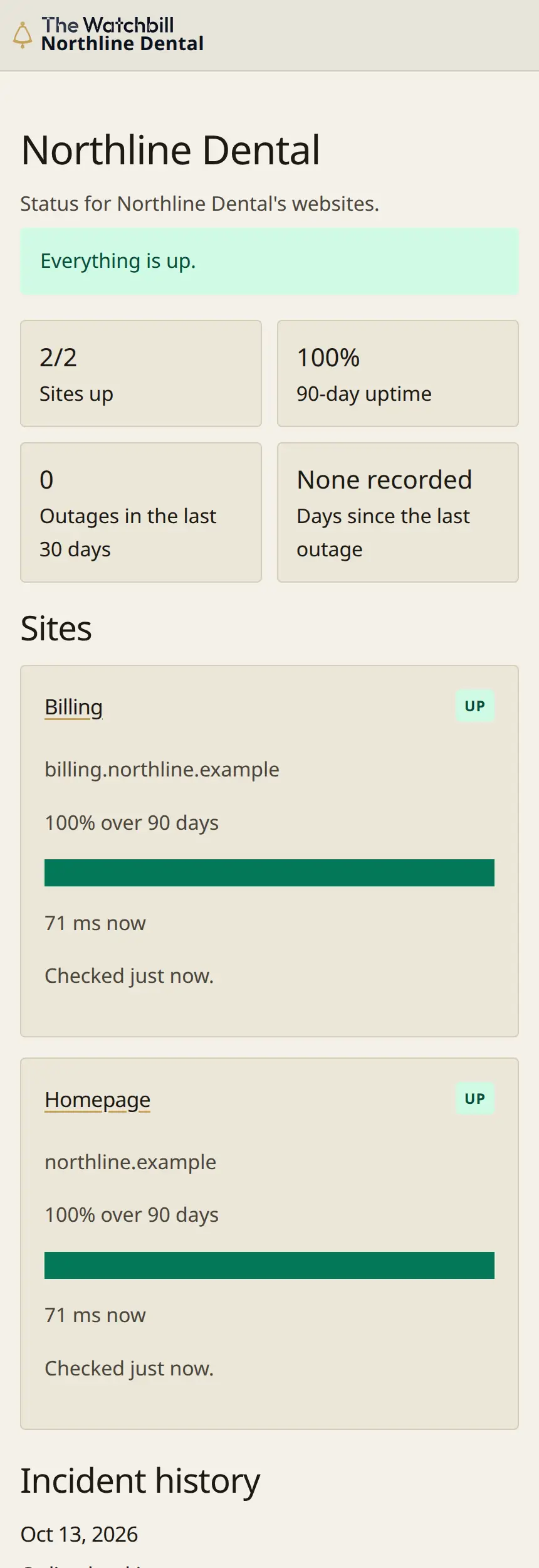
A published status page for an example client. Both sites are up, and the incident history lists a resolved update.A published status page for an example client. Both sites are up, and the incident history lists a resolved update. Full size.
A published status page for an example client. Both sites are up, and the incident history lists a resolved update.A published status page for an example client. Both sites are up, and the incident history lists a resolved update.

A published status page. Each site has an uptime bar, and incident updates stay on the page.

Close
A published status page. Each site has an uptime bar, and incident updates stay on the page.